ImageSieve: AI-Powered Image Categorization Using CLIP for Semantic Photo Organization
Amsterdam Technologies — Solution Whitepaper Product: ImageSieve | Category: Productivity | Status: Production Website…
Amsterdam Technologies — Solution Whitepaper Product: ImageSieve | Category: Productivity | Status: Production Website: https://imagesieve.amsterdam-technologies.com
The Problem
The average smartphone user captures over 2,000 photos per year. Professional photographers, creative agencies, and content teams accumulate tens of thousands of images annually across cameras, phones, screenshots, and downloads. The result is a pervasive, universal problem: unstructured image libraries that grow faster than anyone can organize them.
Manual photo organization — dragging files into folders, applying tags one by one, building albums — does not scale. Studies from the personal information management research community consistently show that users abandon organizational systems once their libraries exceed a few hundred items. The consequence is not merely clutter; it is lost productivity, duplicated effort, and the inability to retrieve images when they matter most.
Existing solutions address this problem inadequately for several reasons:
Keyword-based systems fail on visual content. Traditional file managers and DAM (Digital Asset Management) platforms rely on filenames, folder hierarchies, or manually applied metadata. Images rarely carry meaningful filenames — "IMG_4821.heic" conveys nothing about content. Manual tagging is labor-intensive and inconsistent across users and sessions.
Cloud-based AI services raise privacy concerns. Services from major platform vendors (Google Photos, Apple Photos' on-device ML, Amazon Rekognition) offer some degree of automatic categorization, but they either require uploading images to third-party cloud infrastructure, offer limited customization of categories, or lock users into a specific ecosystem. For professionals handling sensitive imagery — legal evidence, medical photography, confidential product designs — sending images to external servers is often unacceptable.
Existing local tools lack semantic understanding. Desktop photo managers like Adobe Lightroom, Capture One, or digiKam offer metadata-based filtering and some face detection, but they do not understand what an image depicts in a general, open-ended sense. They cannot answer the question "show me all photos of scenic mountain landscapes" without prior manual tagging.
Category systems are rigid. Even where AI-powered tagging exists, it typically uses a fixed taxonomy — a predetermined list of labels that may not match how a given user thinks about their collection. A musician wants categories for "guitars" and "festivals." An architect wants "interior design" and "facades." A food blogger wants "plated dishes" and "cooking process shots." Fixed taxonomies force users to adapt their mental model to the software rather than the reverse.
Duplicate accumulation is unchecked. Across devices, messaging apps, cloud syncs, and downloads, duplicate and near-duplicate images proliferate silently. Without vector-based comparison, detecting visually similar (but not byte-identical) images requires expensive manual review.
The fundamental gap in the market is this: there is no mainstream tool that combines open-ended semantic understanding of image content, user-defined natural language categories, complete privacy through on-device processing, and deep integration with the Apple ecosystem — all in a single application.
Solution Overview
ImageSieve is a native macOS and iOS application that uses OpenAI's CLIP (Contrastive Language-Image Pre-training) model to automatically categorize, search, and analyze images based on their semantic content. Users define categories in plain English — "a portrait photo of a person," "scenic mountain landscape," "a photo of a cat" — and ImageSieve sorts their entire library by comparing visual meaning against those descriptions.
The core insight behind ImageSieve is that CLIP encodes both images and text into the same 768-dimensional (or 1152-dimensional with SigLIP 2) vector space. This means the distance between an image vector and a text description vector is a direct measure of semantic similarity. Rather than training a classifier on fixed labels, ImageSieve lets users define arbitrary categories at any level of specificity — and the matching happens through vector geometry, not keyword overlap.
Three architectural decisions define the product:
On-device inference via CoreML. The CLIP model runs entirely on the user's Mac or iPhone using Apple's CoreML framework, leveraging the Neural Engine and Metal GPU. No images are uploaded to any server. No API keys are required. This addresses the privacy concern directly: the user's photos never leave their machine.
Dual-model support. ImageSieve supports both OpenAI's CLIP ViT-L/14 (768-dimensional embeddings) and Google's SigLIP 2 SO400M (1152-dimensional embeddings). Users can select the model that best fits their accuracy requirements and hardware capabilities, with the application handling re-vectorization transparently when switching models.
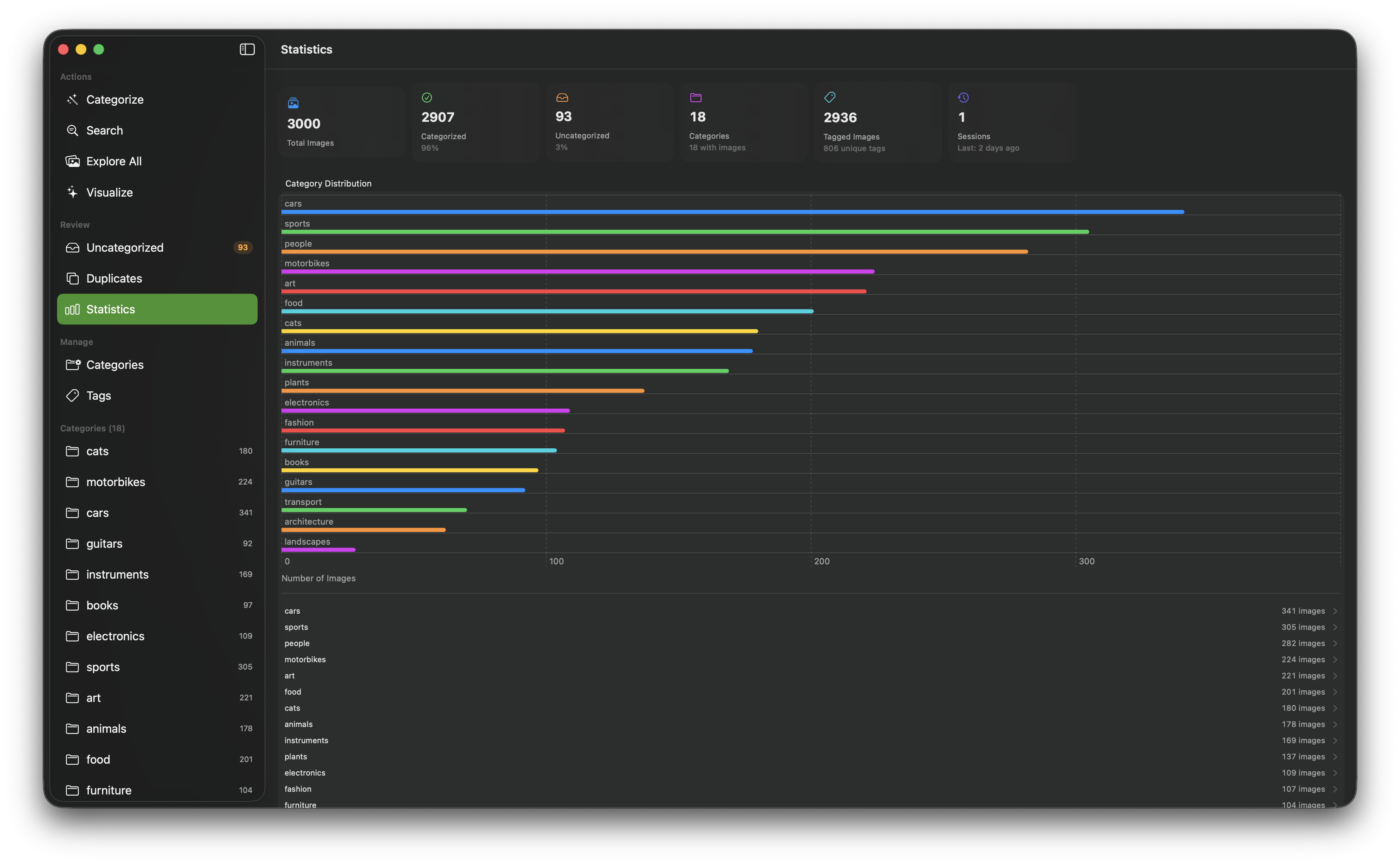
Multi-modal toolkit, not a single feature. Beyond categorization, ImageSieve integrates semantic search, Apple Vision computer vision tagging (scene classification, animal detection, face detection, OCR), EXIF metadata extraction, duplicate detection, and four Metal-rendered 3D visualizations — all operating on the same underlying vector database. This means every image processed through the system becomes richer and more discoverable over time.
ImageSieve is available as a native SwiftUI application for macOS 14.0+ and iOS 17.0+. The product is in production and actively maintained.
Key Capabilities
AI Categorization with Natural Language
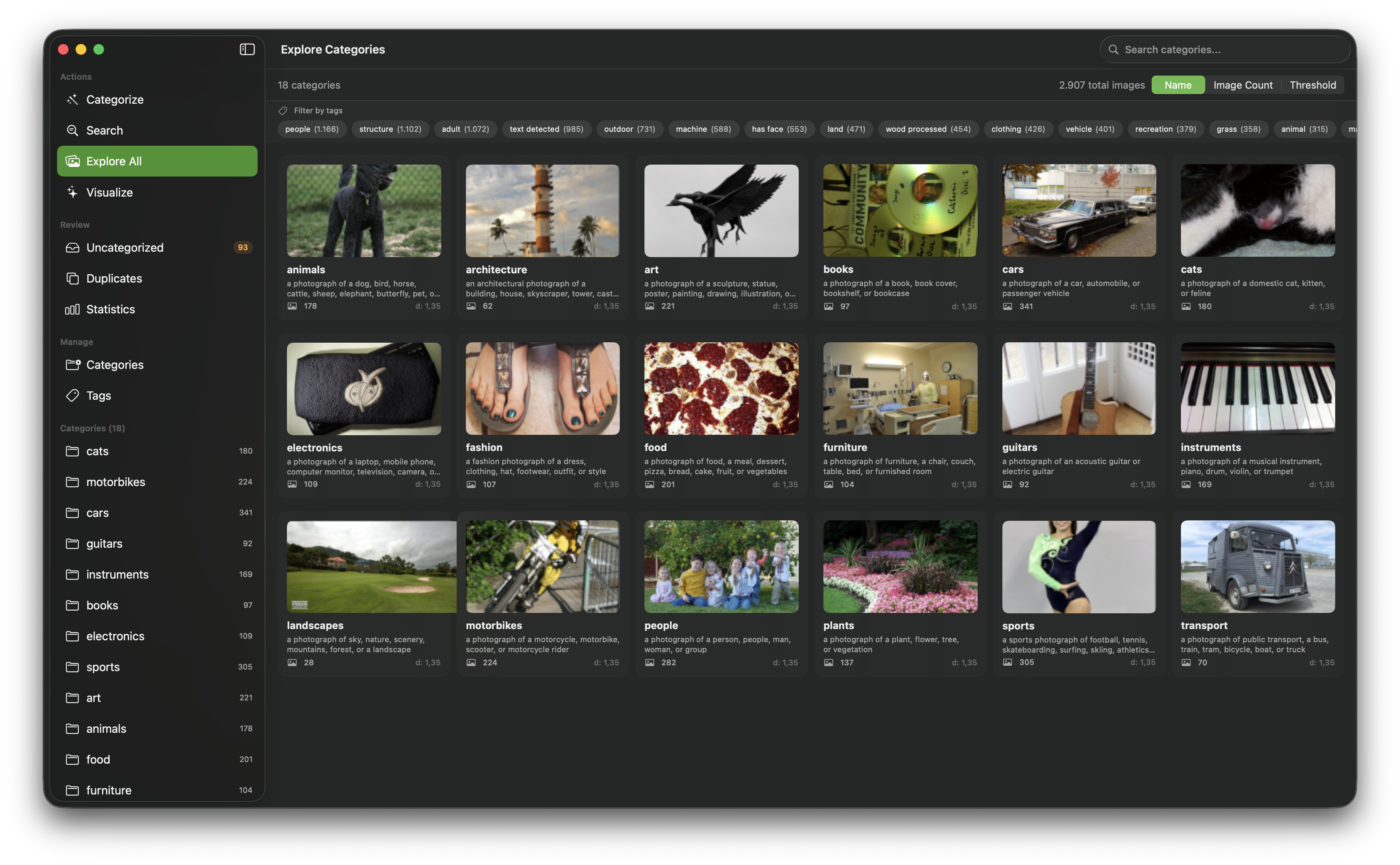
The central capability of ImageSieve is semantic image categorization driven by natural language descriptions. Users define categories using descriptive text — "a landscape photo of nature, mountains, forest, or scenic view" — and each image in the library is automatically assigned to the best-matching category whose angular distance falls below a configurable threshold.
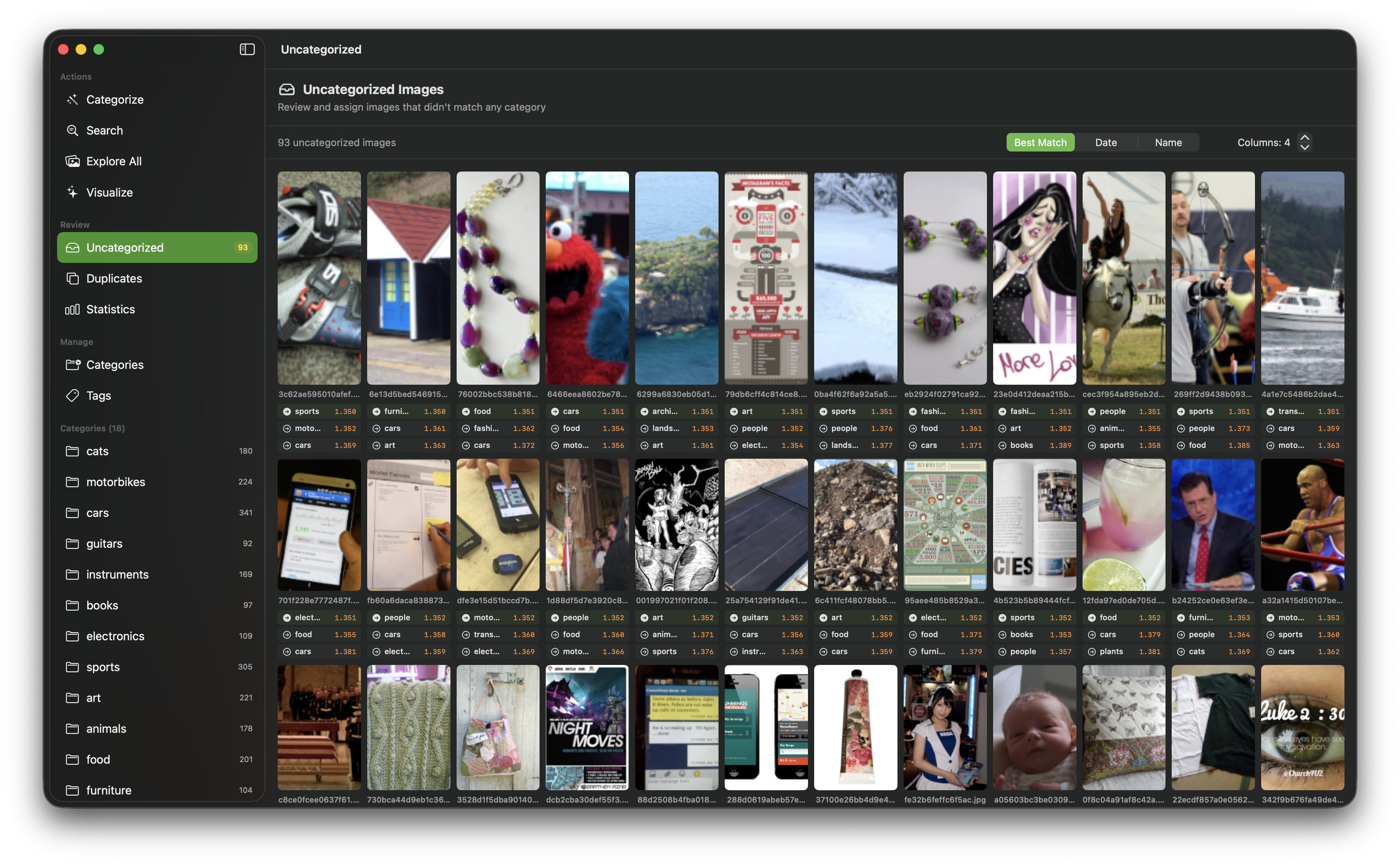
The matching process works as follows: both the category description and the image are encoded into vectors by the CLIP (or SigLIP 2) model. The angular distance between each image vector and all category vectors is computed using the formula angular_distance = sqrt(2 * (1 - cosine_similarity)). The category with the lowest distance wins, provided the distance is below that category's maxDistance threshold. Images that do not match any category are routed to an "uncategorized" triage queue.
ImageSieve ships with 33 pre-configured categories spanning common use cases — from specific objects like "cats" (threshold 1.25) and "guitars" (1.25) to broader concepts like "travel" (1.32) and "memes" (1.38). Each default category has a hand-tuned distance threshold calibrated for balanced precision and recall. Users can fully customize, add, remove, and reorder categories through the native app's category editor or via YAML configuration files. Categories can also be exported and imported as YAML for sharing across machines or teams.
On macOS, categorization supports three input modes: folder-based scanning (scan a directory and copy matches into category subfolders), Photos Library integration (categorize photos from the system Photos library into albums), and drag-and-drop (drop images directly into the app). Processing is concurrent, using Swift TaskGroup for parallel image vectorization. Background reindexing automatically reassigns images when categories are modified, and retroactive tagging applies Vision-detected labels to previously categorized images.
Before existing solutions, achieving this level of semantic categorization required either manual effort or training custom machine learning classifiers — a process that demands labeled training data, ML expertise, and significant compute. ImageSieve eliminates this entirely by using CLIP's zero-shot capability: any natural language description becomes a classifier instantly, with no training step.
Semantic Image Search
ImageSieve's search system operates in the same CLIP vector space used for categorization, enabling three search modalities:
Text queries. Users type natural language descriptions like "sunset over the ocean" and the system returns images ranked by CLIP similarity to that description. This is fundamentally different from keyword search — it understands visual concepts, not just metadata strings.
Image queries. Users drop a reference image into the search interface to find visually similar images in their library. The reference image is vectorized and compared against all stored image vectors.
Combined queries. Text and image queries can be mixed for refined searches — for example, dropping a photo of a beach and adding the text "with palm trees" to narrow results.
Result filtering uses an adaptive relevance mechanism based on statistical gap detection: the system computes the mean and standard deviation of distances across all results and applies an outlier threshold (mean + standard deviation) to automatically separate relevant results from noise. Users can also manually adjust the similarity threshold via a distance slider.
Search queries are logged in a persistent search history, and any set of search results can be saved directly as a new category — bridging the gap between exploratory search and systematic organization.
Computer Vision Tagging
In addition to CLIP-based semantic analysis, ImageSieve leverages Apple's Vision framework to apply over 1,000 classification labels to images automatically:
- Scene classification: Identifies the type of scene depicted (beach, mountain, urban, indoor, etc.) with confidence scores.
- Animal detection: Detects and identifies animals present in images.
- Face detection: Locates faces with bounding box coordinates.
- OCR text recognition: Extracts readable text from images — useful for categorizing screenshots, documents, and signage.
Confidence thresholds for Vision tags are user-configurable, allowing control over sensitivity. Detected tags are fully searchable and can be browsed and filtered through a dedicated tag browser in the app. Tags appear alongside CLIP categories and EXIF data in the image inspector, creating a layered metadata system that combines semantic understanding (CLIP), visual object detection (Vision), and technical metadata (EXIF).
EXIF Metadata Extraction
ImageSieve reads comprehensive camera and location metadata from image files and Photos Library assets:
- Camera make, model, and lens information
- Exposure settings: focal length, aperture (f-stop), ISO sensitivity, shutter speed
- Flash status and white balance mode
- Date and time the image was captured
- GPS coordinates and altitude
- Image dimensions in pixels
Metadata is extracted from JPEG, HEIC, and RAW files. Users can browse their library by camera model or lens, revealing shooting patterns and equipment usage over time. EXIF data feeds directly into the EXIF Explorer 3D visualization (see below) and enriches Spotlight search indexing.
Duplicate Detection
Image duplication across devices, messaging apps, and cloud syncs is a persistent storage and organization problem. ImageSieve detects duplicates and near-duplicates by performing brute-force pairwise comparison of stored CLIP vectors, measuring angular distance between every pair of images in the library.
Detected duplicates are grouped using a Union-Find data structure, which clusters images transitively — if image A is similar to B, and B is similar to C, all three are grouped together even if A and C are not directly similar.
Three threshold presets control detection sensitivity:
| Preset | Angular Distance | Use Case |
|---|---|---|
| Near-identical | 0.08 | Byte-level duplicates, crops, minor edits |
| Visually similar | 0.12 | Same scene from slightly different angles, exposure variations |
| Loose match | 0.18 | Conceptually similar images, same subject in different settings |
A dedicated review interface presents duplicate groups side by side, allowing users to keep their preferred version and discard the rest.
This approach is fundamentally different from hash-based duplicate detection (MD5, perceptual hashing), which can only find exact or near-exact matches. CLIP vector comparison understands visual similarity at a semantic level — it can flag two different photos of the same cat as duplicates, not just two copies of the same file.
3D Visualizations
ImageSieve includes four Metal-rendered, interactive 3D visualizations that provide spatial and analytical perspectives on the image library:
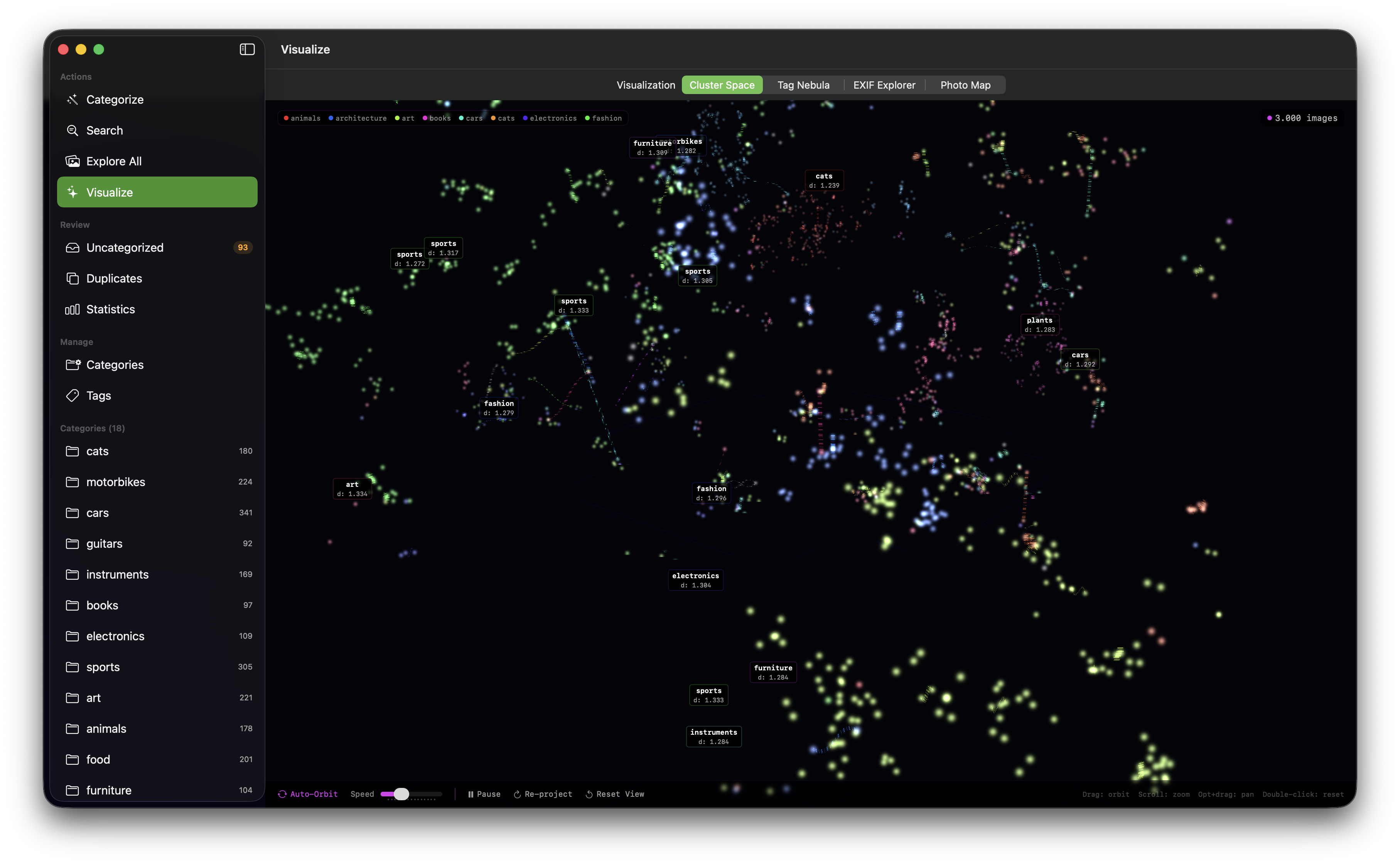
Cluster Space. A 3D scatter plot of CLIP embeddings projected from 768 (or 1152) dimensions into 3D space using t-SNE (t-distributed Stochastic Neighbor Embedding). Points are colored by assigned category, revealing how images cluster by semantic similarity. The t-SNE computation uses Apple's Accelerate framework (vDSP) for vectorized math operations, enabling real-time projection of large libraries. Users can rotate, zoom, and select clusters interactively.
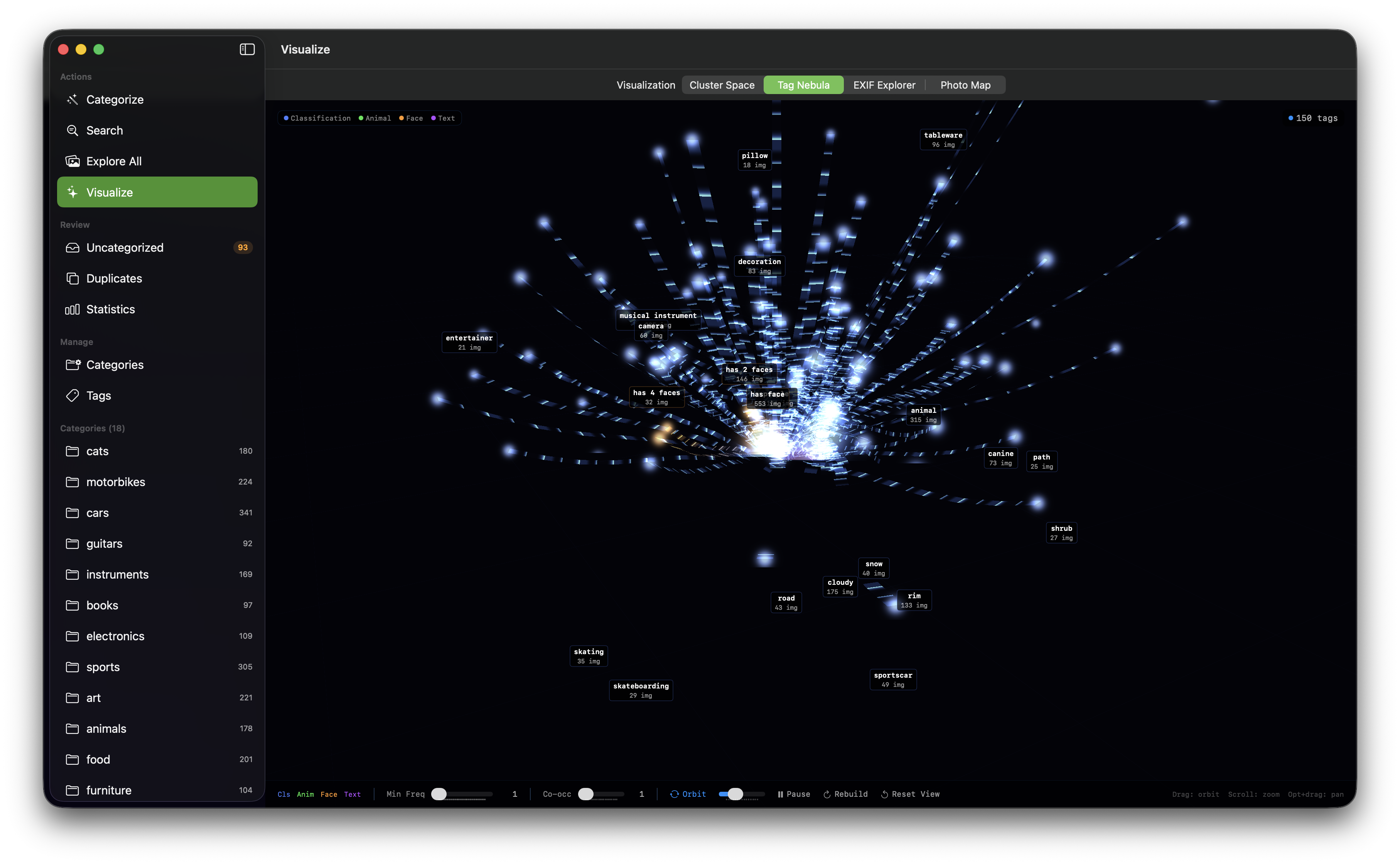
Tag Nebula. A 3D tag cloud of Vision-detected labels, sized and positioned by frequency and co-occurrence. This visualization surfaces the most common visual themes in the library and reveals relationships between tags.
Photo Map. A GPS-based map plotting photo locations extracted from EXIF metadata, with clustering for dense areas. This provides a geographic view of the library, answering questions like "where were my photos taken?" without requiring external mapping services.
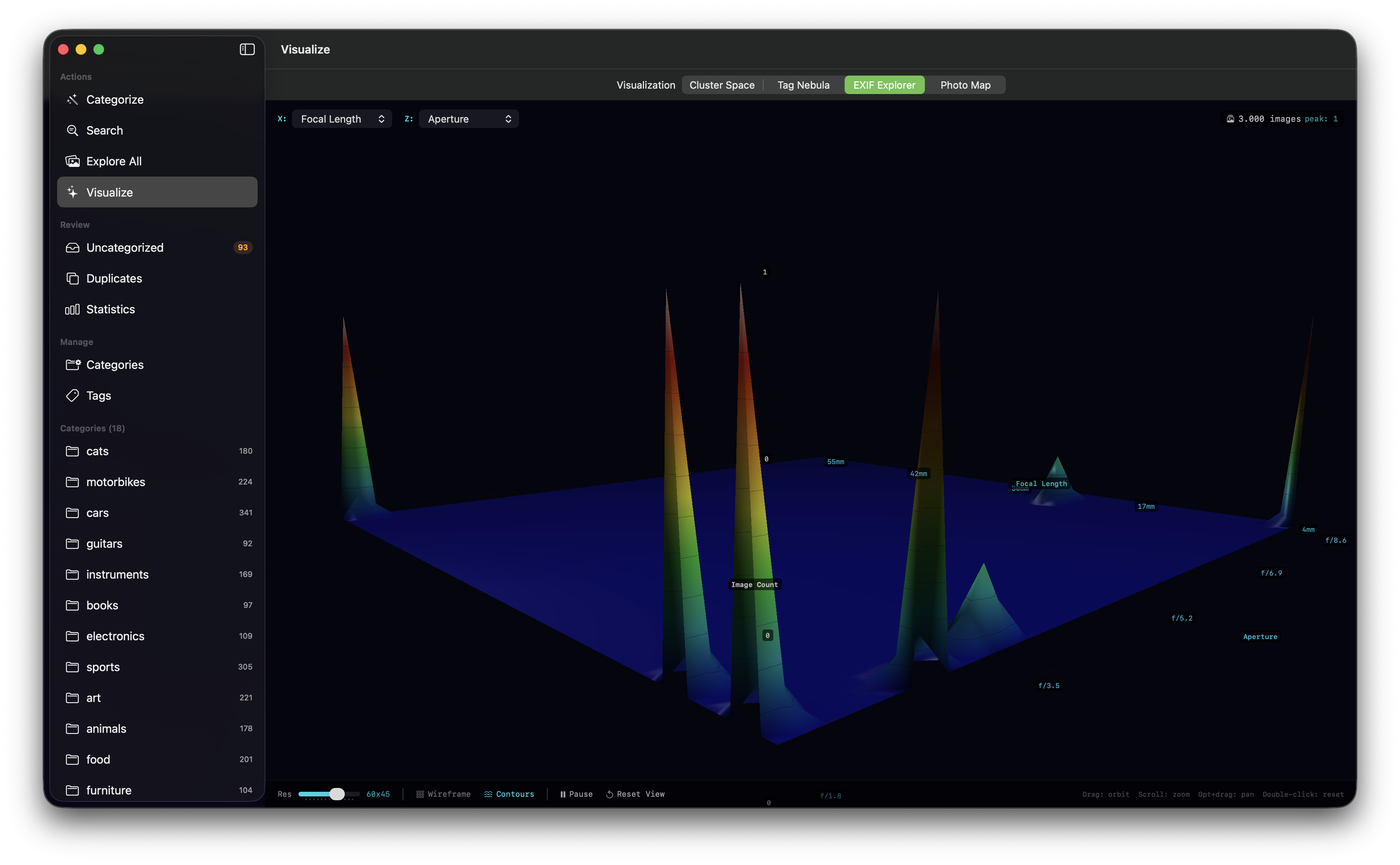
EXIF Explorer. A 3D terrain visualization of EXIF metadata distributions — focal length, aperture, ISO, and other camera settings rendered as an explorable landscape. This helps photographers understand their shooting habits and equipment usage patterns.
All four visualizations render at 60fps using Metal shaders, with interactive camera controls for rotation, panning, and zooming.
Dual AI Model Support
ImageSieve supports two vision-language models, selectable through the Settings interface:
| Property | CLIP ViT-L/14 | SigLIP 2 SO400M |
|---|---|---|
| Embedding dimension | 768 | 1152 |
| Image resolution | 224 x 224 | 384 x 384 |
| Max token length | 76 | 64 |
| Tokenizer | BPE (Byte Pair Encoding) | SentencePiece (Unigram) |
| Model download size | ~1.5 GB | ~2.5 GB |
CLIP ViT-L/14, trained by OpenAI on the DataComp.XL dataset, is the default model — well-understood, broadly validated, and lightweight. SigLIP 2 SO400M, developed by Google, offers higher-dimensional embeddings and larger input resolution, which can improve accuracy for fine-grained categorization tasks.
Switching models requires re-vectorizing all stored images, since the two models produce incompatible embedding spaces. The application handles this transparently: it tracks which model produced each stored vector via a model ID field, invalidates cached category vectors when the model changes, and recomputes as needed. The user receives a confirmation prompt explaining the re-vectorization cost before switching.
The model abstraction layer ensures that all downstream capabilities — categorization, search, duplicate detection, visualizations — work identically regardless of which model is active.
Platform Integration
Spotlight Search. Categorized images are indexed in macOS and iOS Spotlight with filenames, category names, and Vision tags as searchable keywords. Users can find categorized photos from anywhere in the operating system — Spotlight, Finder, or the system search bar — without opening ImageSieve.
Siri Shortcuts. Two App Intents are exposed: "Get Library Statistics" (returns counts of categorized/uncategorized images, categories, and tags) and "List Categories" (enumerates all defined categories). These enable voice-driven and automation-driven access to library metadata.
Photos Library Integration. On macOS and iOS, ImageSieve reads from and writes to the system Photos library via PhotoKit. Categorized images can be organized into Photos albums automatically, bridging ImageSieve's AI categorization with the native Photos experience.
Formats and File Handling
Supported image formats include JPEG, PNG, GIF, WebP, BMP, TIFF, HEIC, and HEIF. Original files are always preserved — images are copied to category folders, never moved.
Architecture & Technical Design
Architectural Philosophy
ImageSieve's architecture optimizes for three properties, in order of priority: privacy (no data leaves the device), performance (leveraging Apple silicon's Neural Engine and GPU for inference), and extensibility (a model abstraction layer that accommodates new vision-language models without restructuring the application).
On-Device Inference Pipeline
The native app's inference pipeline runs entirely within the application sandbox:
-
Model Management. On first launch, the app downloads the selected CoreML model (CLIP ViT-L/14 at ~1.5 GB, or SigLIP 2 SO400M at ~2.5 GB) from Amsterdam Technologies' model hosting. Downloads are verified with SHA-256 checksums. Models are stored locally and persisted across launches.
-
Image Encoding. Each image is resized to the model's expected input resolution (224x224 for CLIP, 384x384 for SigLIP 2), normalized using model-specific constants (ImageNet mean/std for CLIP, 0.5 mean/0.5 std per channel for SigLIP 2), and passed through the CoreML image encoder. The output is a normalized floating-point vector.
-
Text Encoding. Category descriptions are tokenized using the appropriate tokenizer (BPE for CLIP, SentencePiece Unigram for SigLIP 2), padded or truncated to the model's maximum token length, and passed through the CoreML text encoder. The SentencePiece tokenizer is a pure-Swift implementation with no external dependencies — it includes a minimal protobuf parser and implements Viterbi segmentation directly.
-
Vector Comparison. Angular distances are computed between image and category vectors. The distance functions operate on raw float arrays and are dimension-agnostic, working identically for 768-dimensional and 1152-dimensional vectors.
-
Persistence. Vectors are stored as raw Data blobs in SwiftData, with model ID metadata tracking which model produced each vector. This schema requires no migration when switching between models — the dimension change is transparent at the storage level.
Technology Stack
| Layer | Technology |
|---|---|
| UI Framework | SwiftUI |
| Data Persistence | SwiftData |
| AI Inference | CoreML (Neural Engine + Metal GPU) |
| Computer Vision | Apple Vision framework |
| GPU Rendering | Metal (shaders for 3D visualizations) |
| Vector Math | Accelerate framework (vDSP) for t-SNE |
| Text Tokenization | Pure-Swift BPE and SentencePiece implementations |
| System Integration | CoreSpotlight, AppIntents, PhotoKit, MapKit |
Security and Sandbox Model
The native app runs within Apple's App Sandbox. Required capabilities are minimal: outgoing network connections (for model downloads only), user-selected file access (via file pickers), Downloads folder access, security-scoped bookmarks for persistent folder access, and Photos Library read/write access via PhotoKit. The application does not use iCloud/CloudKit, push notifications, location services, camera access, Bluetooth, or any other sensitive capability beyond what is needed for its core function.
Use Cases & Scenarios
Professional Photographer: Post-Shoot Culling and Organization
Role: Wedding and event photographer with 50,000+ images per year. Challenge: After a 10-hour wedding shoot, the photographer has 3,000–5,000 RAW and JPEG files that need to be sorted into deliverable categories (ceremony, reception, portraits, details, candids) before client review.
How ImageSieve addresses it: The photographer defines categories matching their delivery structure — "wedding ceremony at an altar," "bride and groom portrait," "table settings and decorations," "dance floor candid shots." Using the native macOS app, they scan the shoot folder. ImageSieve processes images concurrently using the Apple Neural Engine, categorizing the entire shoot in minutes rather than the hours required for manual sorting. The duplicate detection feature flags near-identical burst shots, and the photographer uses the review interface to keep only the best from each burst. EXIF extraction surfaces lens and exposure data for each shot, helping them identify which equipment performed best at the venue.
Outcome: Post-shoot sorting reduced from 3–4 hours of manual work to under 30 minutes of review and refinement. Client deliverables are organized automatically.
Content Marketing Team: Visual Asset Library Management
Role: Marketing team at a mid-sized e-commerce company managing 20,000+ product and lifestyle images. Challenge: The team's shared drive contains years of product photography, social media assets, campaign imagery, and stock photos with inconsistent naming and no reliable tagging. Finding the right image for a campaign brief requires searching through folders manually or relying on institutional memory of who shot what and when.
How ImageSieve addresses it: The team defines categories aligned with their content taxonomy — "product flat lay on white background," "lifestyle photo showing person using product," "outdoor brand photography," "social media graphic with text overlay." They batch-process the entire asset library on device. The category definitions export to YAML, so the taxonomy is version-controlled alongside their other marketing infrastructure and shared across the team. Semantic search allows art directors to type descriptions like "woman wearing sunglasses near a pool" and retrieve matching assets instantly, ranked by visual relevance.
Outcome: Asset discovery time drops from 15–20 minutes per search to seconds. The team maintains a living, searchable visual library that improves with each batch processed.
Legal and Forensics: Evidence Photo Triage
Role: Digital forensics analyst processing evidence images from seized devices. Challenge: A forensic image of a suspect's phone yields 15,000 photos that must be triaged for relevance to the investigation — identifying images of specific locations, documents, people, or activities from a massive undifferentiated set.
How ImageSieve addresses it: The analyst defines investigation-specific categories: "handwritten document or note," "screenshot of text message conversation," "photo of currency or financial instrument," "photo of a vehicle." All processing runs on-device via CoreML — no evidence images are transmitted to any external service, maintaining chain-of-custody integrity. The OCR capability (via Apple Vision) extracts readable text from screenshots and document photos, making them searchable. The 3D Cluster Space visualization reveals unexpected groupings — semantically similar images that the analyst might not have connected manually.
Outcome: Initial triage of 15,000 images completed in hours rather than days. Privacy-sensitive evidence never leaves the analyst's machine. Semantic clustering surfaces non-obvious connections between images.
Hobbyist Photographer: Personal Photo Library Cleanup
Role: An individual with 10 years of iPhone and DSLR photos — approximately 30,000 images across Apple Photos. Challenge: Years of accumulation have left the Photos library with minimal organization. The user wants to find and collect their best landscape photos, identify all pictures of their pets, clean up duplicate screenshots, and generally impose order on a decade of memories.
How ImageSieve addresses it: Using the native iOS or macOS app with Photos Library integration, the user starts with ImageSieve's 33 default categories — landscapes, portraits, cats, food, architecture, screenshots, and more. Without any configuration, the app categorizes the library and creates corresponding Photos albums. The user then creates custom categories for personal interests ("photos at the beach house," "holiday dinner table"). Duplicate detection with the "visually similar" preset identifies the hundreds of near-duplicate burst shots and similar screenshots accumulated over the years. The Photo Map visualization provides a geographic timeline of a decade of travel.
Outcome: A decade-old photo library goes from unorganized chaos to a categorized, searchable, and deduplicated collection — without uploading a single image to the cloud.
Machine Learning Engineer: Training Data Curation
Role: ML engineer preparing image datasets for model training. Challenge: A large collection of scraped or donated images needs to be filtered and categorized before it can be used as training data. Manual labeling is prohibitively expensive, and existing automated tools produce fixed-taxonomy labels that do not match the project's class definitions.
How ImageSieve addresses it: The engineer defines categories matching the exact class definitions needed for their training dataset, importing them as YAML into the category editor. Each category carries its own distance threshold, and the editor's threshold preview shows how a candidate value scores against real images before it is committed — so precision and recall are tuned per class rather than globally. Batch categorization copies matches into per-category folders on disk, which maps directly to the directory layout expected by common ML training frameworks, and anything falling below threshold collects in the uncategorized triage queue for review.
Outcome: Dataset curation that would require days of manual labeling or expensive annotation services is completed in hours with tunable precision/recall tradeoffs.
Architecture Firm: Project Documentation Archive
Role: Architecture firm with 15 years of project documentation photography. Challenge: Thousands of photos from site visits, construction progress, completed buildings, interior details, and material samples are stored across project folders with inconsistent naming. The firm needs to find reference images for proposals — "show me all our photos of glass facades" or "find interior shots with exposed concrete."
How ImageSieve addresses it: The firm creates categories matching their visual vocabulary — "glass curtain wall facade," "exposed concrete interior," "construction site progress photo," "architectural model or rendering," "building exterior at twilight." Semantic search allows architects to describe what they are looking for in natural language and get ranked results across the entire archive. The EXIF Explorer visualization reveals which camera equipment and settings produced the best architectural documentation, informing future shoot planning.
Outcome: Proposal preparation time is reduced significantly. The firm's entire visual archive becomes a searchable knowledge base rather than a static file dump.
Pricing & Plans
ImageSieve is available as a downloadable application for macOS and iOS with subscription and one-time purchase options. All plans include a 14-day free trial.
| Plan | Price (EUR) | Billing | Included Features |
|---|---|---|---|
| Monthly | €8/month | Monthly, cancel anytime | AI Image Categorization, Semantic Image Search, Duplicate Detection, 3D Visualizations, Computer Vision Tagging, EXIF Metadata, Photos Library Integration, All Future Updates |
| Yearly (Best Value) | €79/year (~€7/month) | Annual billing, save 18% | Everything in Monthly, 2 months free, Priority support |
| Lifetime v1 | €129 one-time | One-time purchase | All v1.x updates included, No recurring fees, All features included |
| Enterprise | Custom | Custom | Unlimited seats, volume licensing, deployment support, dedicated account manager, SLA guarantee, custom category consulting |
The pricing philosophy is straightforward: every plan includes the complete feature set. There are no feature gates between Monthly and Yearly — the difference is purely billing frequency and savings. The Lifetime v1 plan provides permanent access to all current-generation features for users who prefer a one-time purchase. Enterprise arrangements are available for organizations requiring volume licensing, fleet deployment support, or custom integration work.
All prices are in EUR. Subscriptions can be cancelled at any time.
Frequently Asked Questions
Do my photos get uploaded to any server or cloud service?
No. The native macOS and iOS app runs CLIP inference entirely on-device using CoreML. Images are processed locally using the Apple Neural Engine and Metal GPU. No images, vectors, or metadata are transmitted to Amsterdam Technologies or any third party. The only network request the app makes is to download the AI model on first launch (~1.5 GB for CLIP, ~2.5 GB for SigLIP 2).
What platforms and system requirements are supported?
The native app requires macOS 14.0 (Sonoma) or later, or iOS 17.0 or later. It runs on any Mac with Apple Silicon or Intel, and any iPhone or iPad meeting the iOS version requirement. Apple Silicon Macs will see significantly faster inference due to the Neural Engine and unified memory architecture.
How accurate is the categorization? Can I control precision and recall?
Accuracy depends on the specificity of category descriptions and the distance thresholds configured. More specific descriptions ("a close-up portrait photograph of a person's face against a blurred background") produce more precise matches than vague ones ("person"). Each category has an independently configurable distance threshold: lower thresholds (1.20–1.25) enforce strict matching with few false positives, while higher thresholds (1.32–1.38) cast a wider net for abstract or visually diverse categories. The 33 default categories ship with empirically tuned thresholds. The category editor's threshold preview and the uncategorized triage queue help users refine thresholds iteratively.
What image formats are supported?
JPEG, PNG, GIF, WebP, BMP, TIFF, HEIC, and HEIF. On macOS and iOS, Photos Library integration handles any format supported by PhotoKit, including RAW files from major camera manufacturers.
Is there a free trial?
Yes. All plans include a 14-day free trial with full access to all features. Subscriptions can be cancelled at any time during or after the trial period.
Can I switch between the CLIP and SigLIP 2 models?
Yes. The Settings interface provides a model picker. Switching models requires re-vectorizing all stored images because the two models produce incompatible embedding spaces (768 dimensions vs. 1152 dimensions). The app handles this automatically, but the process may take several minutes depending on library size. A confirmation dialog explains the impact before the switch is initiated.
Why Amsterdam Technologies
ImageSieve reflects Amsterdam Technologies' engineering-first approach to productivity software: deeply technical products that solve real problems with precision, built with careful attention to privacy, performance, and platform integration.
Rather than building a thin wrapper around a cloud API, the ImageSieve team invested in on-device CoreML inference, a pure-Swift SentencePiece tokenizer (eliminating external dependencies), custom CoreML model conversion pipelines for SigLIP 2 (including manual reimplementation of attention pooling to work around framework limitations), and Metal-rendered 3D visualizations. These are not shortcuts — they are deliberate engineering choices that result in a product that is faster, more private, and more capable than alternatives that rely on network-dependent inference.
The same product serves a photographer curating a wedding shoot and an ML engineer building a training dataset, because the category system is defined in plain language rather than fixed by a vendor taxonomy. Different professional contexts, the same underlying CLIP intelligence.
Amsterdam Technologies maintains a broad product portfolio spanning productivity, development tools, and security — each product built with the same commitment to technical depth and user sovereignty. ImageSieve is actively developed, with the SigLIP 2 integration representing the most recent major capability expansion. The roadmap includes additional vision-language model support, enhanced batch processing capabilities, and deeper platform integrations.
- Website: https://imagesieve.amsterdam-technologies.com
- Contact: support@amsterdam-technologies.com
- Company: amsterdam-technologies.com